
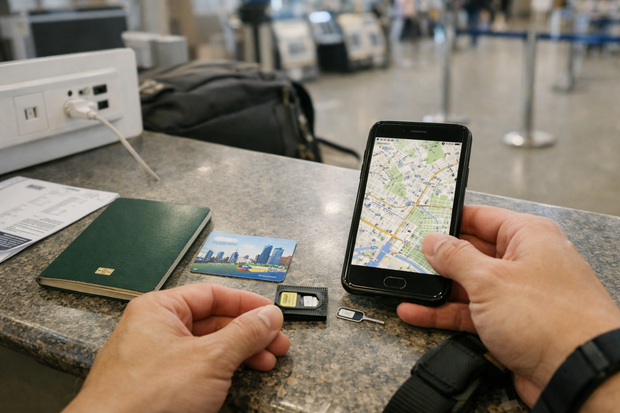
The short answer: Korean cell phone rental — formally called a "휴대폰 대여" (hyu-dae-pon dae-yeo) service — is necessary for fewer than 5% of international visitors. eSIM adoption among tourists reached roughly 70% by the end of 2025, and free public Wi-Fi saturates about 95% of urban South Korea. Most travelers who think they need a rental phone actually need something much simpler and cheaper.
This guide is written for the traveler who has already considered an eSIM, knows what a local SIM card is, and is still wondering whether a full handset rental with a Korean 010 number is worth the extra cost and friction. It is also useful for anyone traveling with an older locked device, coordinating a group trip, or navigating a specific app that, until recently, required local number verification.
Rental phones have not disappeared — they occupy a legitimate niche. At Incheon International Airport Terminal 1, the LG U+, KT, and SKT counters collectively handle thousands of rental transactions a month, many from business travelers and older visitors arriving with devices that simply cannot accept a foreign SIM or eSIM profile. Understanding when that niche applies to your trip, and when it does not, is the whole point of what follows.
Who Actually Needs a Korean Cell Phone Rental?
Quick Answer
A Korean cell phone rental is a temporary handset — issued by LG U+, KT, or SKT at Incheon Airport or select city branches — that comes pre-loaded with a Korean 010 number and a domestic data plan. You pay a daily fee (roughly ₩3,000–₩6,000), carry the physical device, and return it at a designated counter before departure. The use case is specific: you need a Korean 010 number for app verification or local calls, your own device is SIM-locked or incompatible with Korean eSIM profiles, and the trip is short enough that buying a prepaid local SIM outright feels excessive. For any other scenario — including the vast majority of leisure trips — an eSIM (data-only, starting around ₩20,000 for 10 days) or a local tourist SIM (₩20,000–₩50,000 for 10 days with voice and data) is faster, cheaper, and involves far less paperwork at the airport counter.
The clearest signal that you need a rental phone is SIM lock. A device purchased on a carrier contract in certain markets — particularly budget Android phones sold in parts of Southeast Asia, older Japanese handsets, and some US carrier-locked iPhones — may refuse to accept a foreign SIM or download a third-party eSIM profile. If you have confirmed your phone is locked and cannot be unlocked before departure, a rental handset is the path of least resistance (source: koreaetour.com, 2025-11).
The second scenario is the group or family trip where a single shared device makes economic and logistical sense. A pocket Wi-Fi / 와이파이 에그 / portable hotspot handles data for multiple travelers, but it does not give anyone a callable Korean number. If the group needs to split up and one member requires a local number for restaurant reservations or taxi coordination, a single rental phone covering that function — at roughly ₩4,000 per day for an LG U+ handset — can be more cost-effective than buying a full local SIM for every member of the party (source: deborahinkorea.com, 2024-09).
Korean Phone Rental Providers: Airports, Prices, and Procedures
Three carriers dominate Korean phone rental at Incheon International Airport: LG U+, KT (formerly Korea Telecom), and SKT (SK Telecom). All three operate counters inside the arrivals hall of Terminal 1; KT and SKT also serve Terminal 2. Post-pandemic pocket Wi-Fi / 와이파이 에그 rentals at Incheon surged approximately 40%, and carriers responded by expanding their counters and extending hours — LG U+ now runs its T1 counter 24 hours a day, seven days a week. Beyond the airport, city-center rental options exist at satellite carrier branches and at third-party shops such as the Creatrip iPhone rental location in Hongdae, Seoul. Pricing is structured as a daily rate with a capped monthly ceiling, making short trips relatively expensive per day but longer stays more competitive. The table below summarizes the key variables across all five major rental points.
| Provider / Location | Airport / Branch | Hours | Price Range (KRW) | Korean 010 Number |
|---|---|---|---|---|
| LG U+ Incheon T1 | Incheon T1 Arrivals Hall, near Gates A & F | 24/7 | ~₩4,000/day; 30+ days ~₩55,000 total | Yes — included |
| KT Roaming Center (T1 & T2) | Incheon T1 and T2 Arrivals | 06:00–24:00 | ₩3,000–₩6,000/day; full 5-day ~₩40,000 | Yes — included |
| SKT T Roaming (T1 & T2) | Incheon T1 and T2 Arrivals | 24/7 | ₩3,000–₩5,000/day (device + SIM bundle) | Yes — included |
| Creatrip iPhone Rental Hongdae | 20 Yanghwa-ro 13-gil, Mapo-gu, Seoul | 10:00–22:00 daily | ₩20,000–₩30,000/day flat | Yes — included |
| LG U+ Olympic Park Branch | Near Olympic Park Station, Songpa-gu, Seoul | 09:00–21:00 | ₩4,000/day (standard rates) | Yes — included |
LG U+ Incheon Airport: Step-by-Step Rental Procedure
The LG U+ counter at Incheon Terminal 1 is positioned in the Arrivals Hall between Gates A and F, making it one of the first service counters visible after clearing customs. The process is straightforward but benefits from knowing the steps in advance to avoid delays during peak arrival windows.
- Locate the counter. Follow "LG U+ Roaming & Rental" signage in the Arrivals Hall. The counter is staffed 24 hours a day and handles both pocket Wi-Fi / 와이파이 에그 / portable hotspot rentals and full handset rentals from the same desk.
- Present your documents. You will need your passport and the credit or debit card you intend to use for the security deposit. International driving licenses are not accepted as identity documents at this counter.
- Select a rental plan. Staff will ask for your return date and present plan options. The standard handset rental runs approximately ₩4,000 per day, with data either bundled or available as an add-on. Confirm whether the plan includes voice minutes or data only.
- Sign the rental agreement and authorize the deposit hold. A credit card hold — typically ₩300,000–₩500,000 — is placed for the device. This is a hold, not a charge; it releases automatically upon return of the undamaged phone.
- Collect the device and confirm the 010 number. Before leaving the counter, power on the device, confirm the 010 number displayed under Settings, and save it in a note on your personal phone or on paper. This number is what you will use for any Korean app verification during your stay.
KT and SKT Roaming Centers
KT's roaming center at Incheon operates at both Terminal 1 and Terminal 2 and is open from 06:00 to 24:00 — the only major carrier counter that is not 24/7, which matters if you arrive on a very late or very early flight. KT's network is widely regarded as having the broadest rural coverage of the three carriers, a distinction that becomes meaningful if your itinerary takes you into Gangwon-do, the North Jeolla coast, or remote parts of Jeju. A combined SIM-plus-phone bundle from KT runs ₩3,000–₩6,000 per day, with a full five-day rental totaling approximately ₩40,000.
SKT's T Roaming service operates 24/7 at both T1 and T2 and offers similar pricing — ₩3,000–₩5,000 per day depending on the device tier selected. SKT has historically invested more heavily in urban 5G infrastructure, making it a marginally stronger choice if the trip is Seoul-centric and high-bandwidth activity (video streaming, video calls) is a priority. Both KT and SKT allow advance reservation through their respective global roaming websites, which can shorten counter time at arrival from 20–30 minutes to under 10 minutes.
Creatrip iPhone Rental in Hongdae: The City-Center Option
For travelers who have already reached Seoul and then realize they need a device with a Korean number — perhaps because an itinerary changed or a work meeting was added — the Creatrip-partnered iPhone rental shop in Hongdae offers a city-center alternative to a return trip to Incheon. The address is 20 Yanghwa-ro 13-gil, Mapo-gu, Seoul, and the shop is open daily from 10:00 to 22:00. The daily rate of ₩20,000–₩30,000 is considerably higher than the airport carriers, but it is competitive when the cost of an airport transit (subway to Incheon and back) is factored in (source: creatrip.com, 2025-08).
The Creatrip location focuses specifically on iPhones, which appeals to travelers who need seamless integration with an Apple Watch or who prefer a familiar iOS environment. Returns are accepted at the same location, so the logistics are clean provided you are in western Seoul near the Hongdae–Hapjeong corridor. The shop also rents pocket Wi-Fi units if data-only connectivity is all that is required.
Understanding the Korean 010 Number — Why It Matters for Some Apps
A Korean 010 number is a mobile phone number assigned under the unified 010 prefix that South Korea adopted in 2004, replacing the older carrier-specific prefixes (011 for SKT, 016 for KT, 019 for LG U+). Every mobile subscription issued in South Korea since 2004 begins with 010, followed by eight digits. When Korean apps ask for "phone number verification," they historically designed that verification flow around the 010 format — an SMS code sent to a domestic Korean number — because the original user base was entirely domestic. International tourists had no clean path through that verification unless they borrowed a Korean resident's phone or rented a handset with a 010 SIM. The situation has materially changed since 2024–2025, but it has not entirely resolved, and understanding which apps still require a 010 number versus which have opened verification to international numbers is the key decision variable for most travelers considering a rental.
Which Apps Require a Korean Phone Number
The most important app for most tourists is KakaoTalk / 카카오톡 / Korea's dominant messaging platform, used by over 45 million people in Korea. KakaoTalk has historically required a phone number for account creation, and for years that meant a Korean 010 number was effectively mandatory for anyone who wanted to communicate with Korean contacts, book experiences, or confirm reservations through the app. As of March 2025, KakaoTalk's verification system accepts phone numbers from 82 countries, which covers the overwhelming majority of international tourists. The practical implication: if you have a working foreign number that can receive SMS, you can create and verify a KakaoTalk account without any Korean number at all (source: sg.trip.com, 2025-10).
Naver / 네이버 / Korea's dominant search and maps platform has a similar trajectory. Naver Map and Naver Pay both request phone verification during account setup, but Naver's international verification has been functional for most major country codes since mid-2024. That said, certain Naver Pay features — particularly those tied to Korean bank accounts or domestic carrier billing — remain inaccessible to non-residents regardless of number type. For basic navigation, restaurant search, and public transit routing, a Naver account registered with a foreign number functions identically to one registered with a 010 number.
Kakao T / 카카오 T / the taxi-hailing app connected to the KakaoTalk ecosystem, began accepting international phone numbers for account registration in 2024. This was a significant change for tourists who had previously needed a 010 number specifically to use Kakao T, which connects to the largest pool of Korean taxis including the premium Kakao Black service. The residual edge cases — a small number of in-app payment features that require a Korean-issued credit card regardless of phone number — are payment-related, not number-related, and a reliable payment option like the NAMANE Card, a reloadable Korean travel card designed for foreign visitors, addresses the payment side of that equation independently.
KakaoTalk Verification Without a Korean Number
Since the March 2025 update, KakaoTalk's account creation screen displays a country code selector before the phone number field. Selecting your home country and entering your personal mobile number will trigger an SMS verification code to that number. Once verified, the account functions identically to one created with a Korean 010 number for messaging, group chats, and KakaoTalk-integrated services including Kakao T. The setup process takes approximately three minutes assuming SMS delivery is prompt — which it is for most major international carriers.
The remaining narrow edge cases where a 010 number still provides an advantage are: creating a second KakaoTalk account on a single device (Korea-based users sometimes manage two accounts), accessing KakaoTalk-linked services that explicitly require Korean residency verification (such as certain government portal integrations), and situations where an SMS from a foreign carrier is delayed or blocked by the traveler's home carrier's international roaming settings. In those specific cases — and genuinely only in those cases — a rental phone with a 010 number remains the cleanest workaround.
Pocket Wi-Fi vs. eSIM vs. Phone Rental: The Complete Comparison
The connectivity decision for a Korea trip is best framed as a decision tree rather than a ranking. Each option serves a different primary need, and the right choice depends on three variables: whether you need a callable Korean number, whether your device supports eSIM, and how many travelers are sharing the connection. eSIM profiles from providers such as Airalo or Holafly cost approximately ₩20,000–₩30,000 for 10 days of data-only service, install in under five minutes, and require no counter visit. Local tourist SIMs cost ₩20,000–₩50,000 for 10 days and include voice capability but require a SIM-unlocked device. Pocket Wi-Fi / 와이파이 에그 devices run ₩4,000–₩5,000 per day at carrier counters and share a single data connection across multiple devices, with no individual 010 number. The full handset rental layers a 010 number on top of a pocket Wi-Fi–class data plan but at the cost of carrying a second physical device.
| Option | Price KRW (10 days) | Korean 010 Number | Setup Speed | Works on Any Device | Best For |
|---|---|---|---|---|---|
| eSIM (Airalo / Holafly) | ~₩20,000–₩30,000 | No | Under 5 min, pre-trip | eSIM-compatible devices only | Solo / couple, modern unlocked devices |
| Local Tourist SIM | ₩20,000–₩50,000 | Sometimes (voice SIMs) | 15–30 min at counter | SIM-unlocked devices only | Budget travelers needing voice + data |
| Pocket Wi-Fi / 와이파이 에그 | ~₩40,000–₩50,000 | No | 5–10 min at counter | Yes — any Wi-Fi device | Groups of 2–5 sharing data |
| Full Phone Rental (010 handset) | ~₩40,000–₩60,000 | Yes — always | 20–30 min at counter | Yes — also works as hotspot | SIM-locked device owners, 010 number needed |
When Pocket Wi-Fi Beats Everything Else
The pocket Wi-Fi / 와이파이 에그 calculus becomes favorable the moment a trip involves three or more travelers who all need data simultaneously. At ₩4,000–₩5,000 per day for the device, split three ways, each person is paying roughly ₩1,300–₩1,700 per day — a fraction of any individual eSIM or SIM cost. The device connects up to 10 users simultaneously over LTE or 5G, which covers most family trips and small tour groups without anyone needing to manage individual SIM installations or eSIM profiles on multiple devices. The practical downsides are the need to keep the device charged (a portable battery / 보조배터리 / power bank is a near-mandatory companion), the risk of the hotspot device being left in a taxi, and the absence of a callable number for anyone in the group (source: deborahinkorea.com, 2024-09).
Where pocket Wi-Fi falls behind eSIM is in the solo or couple scenario where each traveler wants a fully independent connection. A single pocket Wi-Fi unit satisfies data needs, but if one person forgets to charge it or if the group splits across different neighborhoods for an afternoon, connectivity for both parties evaporates simultaneously. For that reason, many experienced Korea travelers pair a pocket Wi-Fi unit for heavy shared use — streaming, navigation, group video calls — with a data-only eSIM on at least one device as a backup. This hybrid approach is overkill for most leisure trips but sensible for longer stays or work-adjacent visits.
Practical Tips for Korean Phone Rental Users
For travelers who have determined that a rental phone is the right tool for their trip, a small number of procedural details separate a smooth experience from a frustrating one. Korean carrier counters at Incheon are efficient but handle high volumes during peak arrival windows — the 08:00–12:00 slot on weekends and after major long-haul flights from North America and Europe. Planning around those windows, or pre-booking online, saves meaningful time on arrival day.
- Pre-book online when possible. KT and SKT both accept advance reservations through their roaming portals, often with a modest discount (₩500–₩1,000/day). LG U+ accepts reservations through its English-language website. Pre-booking guarantees device availability and reduces counter time from 20–30 minutes to under 10.
- Verify the return policy before leaving the counter. Most carriers require return at the same airport terminal counter or at a designated city-branch return point. Some allow mail-return using a prepaid envelope, but this is not universally available. Confirm in writing which return options apply to your rental agreement.
- Screenshot the 010 number immediately. Save the rental phone's 010 number as a contact in your own device or photograph the number on the rental agreement. You will need it if you are separated from the rental phone and someone needs to reach you.
- Understand the deposit hold. The ₩300,000–₩500,000 credit card hold for the device is a temporary authorization, not a charge, but it will reduce your available credit limit for the duration of the rental. If you are traveling on a card with a modest limit, use a card with sufficient headroom or inquire about a cash deposit alternative at the counter.
- Bring a backup portable charger / 보조배터리. Rental handsets are typically mid-range Android devices with batteries sized for normal usage — not for the GPS-heavy, camera-active pattern of a tourist day. A 10,000mAh portable battery is sufficient to top up the rental device once through a full day of heavy use.
- Use the 010 number for KakaoTalk setup, then migrate. If your goal was specifically to create a KakaoTalk account with a Korean number, complete that setup on the rental device and link your personal email address as a backup. After returning the rental phone, you can transfer the KakaoTalk account to your own device using the email recovery path without losing contacts or conversation history.
A final note on financial logistics: the rental phone handles calls and Korean app functions, but it does not solve the payment side of your trip. For subway rides, convenience store purchases, and café payments without the friction of foreign card fees, a dedicated Korean prepaid card for foreigners like the NAMANE Card is a practical complement. Details on loading funds, reloading, and the refund process at the end of your trip are covered in the NAMANE Card service manual, which walks through each step in English.
Connectivity in Rural Korea: Does a Rental Phone Change the Equation?
South Korea's urban connectivity is exceptional by any global standard — free public Wi-Fi covers approximately 95% of major city areas including subway stations, convenience stores, cafés, and most tourist sites (source: Visit Korea,). The story changes meaningfully once an itinerary moves into Gangwon-do mountain corridors, the interior of North Gyeongsang Province, or the more remote coastal sections of the South Sea. In those areas, Wi-Fi availability drops sharply, and the quality of a cellular connection depends entirely on which carrier's SIM is in the device.
The 2018 Pyeongchang Winter Olympics served as a before-and-after marker for rural connectivity in Gangwon-do. Prior to the Games, 4G coverage along the Seoul–Gangneung KTX corridor and in the mountain venues around Pyeongchang was inconsistent, particularly for non-SKT users. The Olympic infrastructure investment — and the subsequent competitive pressure it created — pushed all three major carriers to extend their 4G and early 5G coverage along those transit corridors and into surrounding valleys. The result is that rural Gangwon-do connectivity is substantially better than it was eight years ago, but coverage maps still show KT and SKT maintaining stronger rural signal than LG U+ in that region.
The practical recommendation for rural travel is to prioritize carrier over device type. A KT or SKT SIM in your own unlocked phone will outperform an LG U+ rental handset in Gangwon-do or rural Jeolla. If the device is locked and a rental is unavoidable, specifically request a KT or SKT device rather than defaulting to whichever counter has the shortest queue.
Frequently Asked Questions
Can I use a Korean rental phone with my own SIM card inserted?
No — rental phones issued by Korean carriers are SIM-locked to the issuing network for the duration of the rental period. The device ships with the carrier's own SIM already installed and activated under a 010 number. Inserting your own SIM would require unlocking the device, which carriers do not permit on rental units. The rental agreement typically specifies this restriction. If you want to use your own SIM, a tourist SIM from the same counter is the correct product.
Do Korean phone rentals include unlimited data?
Most standard rental plans include a high-speed LTE or 5G data allowance rather than strictly unlimited data. LG U+ and KT rental plans typically offer daily high-speed caps of 1–3 GB per day, with speed throttling thereafter. Some premium plans — available at higher daily rates — include genuinely unlimited high-speed data. Confirm the data terms at the counter before signing, particularly if your use case involves streaming or extended video calls. Pocket Wi-Fi / 와이파이 에그 rentals from the same counters often have similar daily caps.
Can I get a Korean 010 number on an eSIM without renting a phone?
Yes, but with caveats. Several Korean carriers and MVNO providers offer voice-capable eSIM plans that assign a Korean 010 number to a compatible device. As of 2025–, KT and SKT both offer eSIM-based tourist plans with 010 numbers through select online channels. Availability varies by device compatibility and the traveler's country of residence. Data-only eSIMs from providers like Airalo and Holafly remain the more widely available option and do not include a 010 number. For the specific eSIM-with-010-number path, check the carrier's English-language roaming site before departure (source: koreaetour.com, 2025-11).
What happens if I lose or damage a rental phone in Korea?
The security deposit hold of ₩300,000–₩500,000 on your credit card exists precisely for this scenario. If the device is lost or sustains damage beyond normal wear, the carrier will charge part or all of the deposit against the credit card on file. Some rental agreements include a basic damage waiver for an additional daily fee — typically ₩500–₩1,000 extra per day — that limits liability to a fixed excess amount rather than full device replacement cost. Review this option at the counter, particularly if traveling with children or in conditions where device damage is realistic.
Is it cheaper to rent a phone or buy a local SIM in Korea?
For trips of 10 days or more, a local tourist SIM is almost always cheaper than a phone rental, assuming your device is SIM-unlocked. A 10-day tourist SIM with data and voice costs ₩20,000–₩50,000 as a one-time purchase, versus ₩30,000–₩60,000 in cumulative daily rental fees for the same period. For trips shorter than five days where a 010 number is essential, the rental can be cost-competitive because it requires no upfront single-purchase commitment. Current SIM and rental pricing is available through the Korea Tourism Organization resources at Visit Korea (visitkorea.or.kr).
Are there Korean phone rental services available outside the airport?
Yes. Beyond Incheon, rental options exist at Gimpo Airport (KT and LG U+ counters), at the Creatrip iPhone rental shop at 20 Yanghwa-ro 13-gil, Mapo-gu, Seoul (Hongdae area, 10:00–22:00 daily), and at the LG U+ Olympic Park Branch near Olympic Park Station in Songpa-gu (09:00–21:00). City-center rental rates are generally higher than airport counter rates — the Hongdae Creatrip location charges ₩20,000–₩30,000 per day, reflecting the convenience premium of a central Seoul location. Reservations are recommended for city branches, which have smaller device inventories than airport counters (source: creatrip.com, 2025-08).
Does a rental phone work for Kakao T taxi hailing?
Yes, and it works reliably. Kakao T / 카카오 T, Korea's primary taxi-hailing app, has accepted international phone numbers for account registration since 2024 — so a rental phone's 010 number is no longer strictly required just to use Kakao T. However, the rental phone's 010 number provides one practical advantage: Korean taxi drivers who call back to confirm a pickup reach you on the device you are carrying, rather than requiring them to dial a foreign number that may display as unknown. For straightforward urban hailing in Seoul or Busan, a Kakao T account registered with your foreign number works reliably; the 010 number becomes more useful for longer-distance trips where driver callbacks are common.
Bringing It All Together
The rental phone decision maps onto a simple diagnostic: does your trip have a 010 number requirement that cannot be resolved through your own device, and is your device incapable of accepting a Korean SIM or eSIM? If both answers are yes, a rental phone from Incheon's LG U+, KT, or SKT counter is the correct solution — efficient, well-priced for short trips, and backed by Korea's three largest carriers. If either answer is no, you are paying a premium for a second physical device you do not need. The 70% eSIM adoption rate among international tourists reflects a genuine shift in how traveler connectivity works, driven by eSIM-compatible hardware becoming the default across premium and mid-range devices globally.
A useful pre-departure checklist: Is my phone SIM-unlocked or eSIM-compatible? (If yes, get an eSIM or local SIM.) Do I specifically need a Korean 010 number for apps my itinerary requires? (Check: KakaoTalk now accepts 82 countries; Kakao T accepts international numbers; Naver accepts most international codes.) Am I traveling in a group of three or more people who all need data? (Consider pocket Wi-Fi, with a rental phone added only if a callable number is needed.) Am I spending significant time in rural Gangwon-do or remote coastal areas? (Prioritize KT or SKT over LG U+ if a rental is the path chosen.) Budget summary for a 10-day trip: eSIM data-only ₩20,000–₩30,000; tourist SIM with voice ₩20,000–₩50,000; pocket Wi-Fi shared across 3+ travelers ₩40,000–₩50,000 total; full phone rental ₩40,000–₩60,000 with ₩300,000–₩500,000 deposit hold.
Connectivity is one layer of Korea trip logistics; payments are another. Korea remains heavily card-oriented at convenience stores, transit gates, and cafés — but foreign cards carry fees and are declined at some terminals. A NAMANE Card — a reloadable Korean prepaid card for foreigners — covers the payment gap that neither a rental phone nor an eSIM addresses, and it does not require a Korean phone number to set up or reload. With connectivity and payments sorted in advance, the administrative overhead of a Korea trip compresses to almost nothing.
Last updated: 2026-04-30. This guide is reviewed and refreshed when official sources (KTO, Visit Korea, carrier pricing pages) update their information.
Related Articles
- Calling a Taxi in Korea: Kakao T English vs Street Hailing
- What's Korea's April Temperature? Introduction to Temperature, Clothing, and Latest Cherry Blossom Bloom Forecast!
- 【Permanent Edition】 Enjoy Your Korea Trip Hands-Free! The Complete Guide to Luggage Delivery Services Between Airports and Hotels
- How to Handle Portable Chargers When Traveling to Korea? From Airline Carry-On Regulations to Tips for Saving Money Locally!
- Recharge with PayPay! Make Korean subway and bus travel even more convenient with your NAMANE Card
This article was written using information collected and analyzed by NAMANE's in-house K-pop research AI engine. We use AI technology to bring you faster, broader coverage, and in the process some details may occasionally differ from the latest facts. For important information such as dates, venues, and prices, please double-check with official sources.


